Project terminals
Real PTY shells per project: claude, ssh, ftp, server, RDP. Split, drag to resize, tree-kill safe. Even a hard crash leaves no zombies.
Personal dev cockpit
Hyperium is the daily driver for the solo dev who runs ten stacks before lunch. Real terminals, an ambient notes brain, voice braindump, a health coach and your own leverage tools, all in a single signed executable. No Electron. No cloud. No noise.
The problem
Ten terminals in three windows. Notes in an app you forgot to open. TODOs you never wrote down because you were in the flow. A wiki you never launch. The tax isn't any single tool, it's the switching between them.
Hyperium collapses the whole workday into one cockpit: projects on the left, terminals in the middle, an ambient memory that writes itself, and tools that exist for real daily needs. You stop managing your setup and start flying it.
What's inside
Not a multi-agent orchestrator. One person's daily driver, where every feature earns its place by removing real friction.
Real PTY shells per project: claude, ssh, ftp, server, RDP. Split, drag to resize, tree-kill safe. Even a hard crash leaves no zombies.
Dump a raw thought and an LLM files it into a living NOTES.md (State / Decisions / Tasks / Ideas). The record derives from your dumps. Never maintain a tracker again.
Ctrl+PPress once, talk, done. Whisper transcribes right on your machine, so the recording itself is never uploaded. You're back in the flow before the note is even filed.
Gentle nudges and daily streaks that keep you moving through a marathon session. Push-ups, water, whatever you set. Maintain the archer.
Command memo, quality-first media converter, machine doctor, health heatmap. Real tools for real daily needs: the beating heart of the cockpit.
Ctrl+SpaceNotes sync to your own FTP, end-to-end encrypted before they leave, so the server only holds ciphertext. Updates arrive signed and verified: one safe click.
Any project with a mkdocs.yml gets a one-click MkDocs launcher, right from the sidebar. Local, instant, zero setup scripts.
Rotating snapshots of everything git doesn't cover: config, launchers, streaks, braindumps. One-click restore puts it all back where it came from.
Probe exactly which runtimes, SDKs and CLI tools this PC really has, so a fresh machine tells you what it's missing before you find out the hard way.
The cockpit
Projects on the left. A grid of live terminals in the middle. Health, sync status and machine vitals glanceable in the bar. Open a project and everything it needs is already there.
Sidebar · terminals · palette · inspector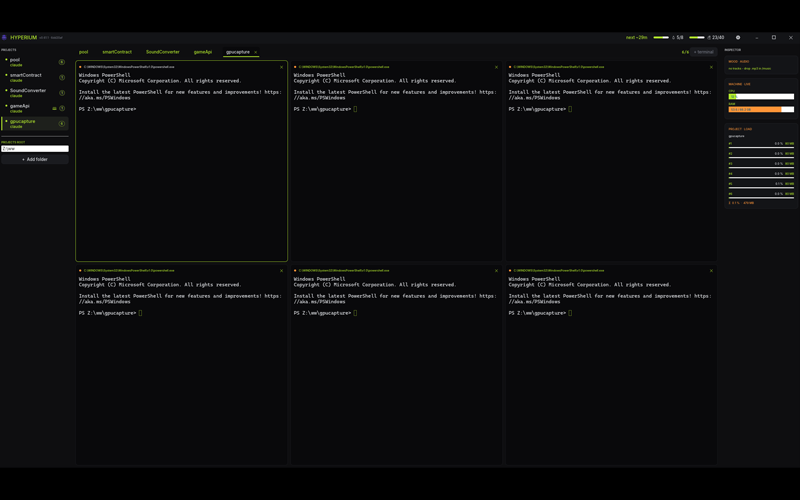
Ambient memory
Built for someone who thrives in chaos and won't maintain a tracker by hand. Dump a thought by text or voice; a small Claude call consolidates it into a living, structured NOTES.md your coding assistant can read as context.
Raw dump → living synthesis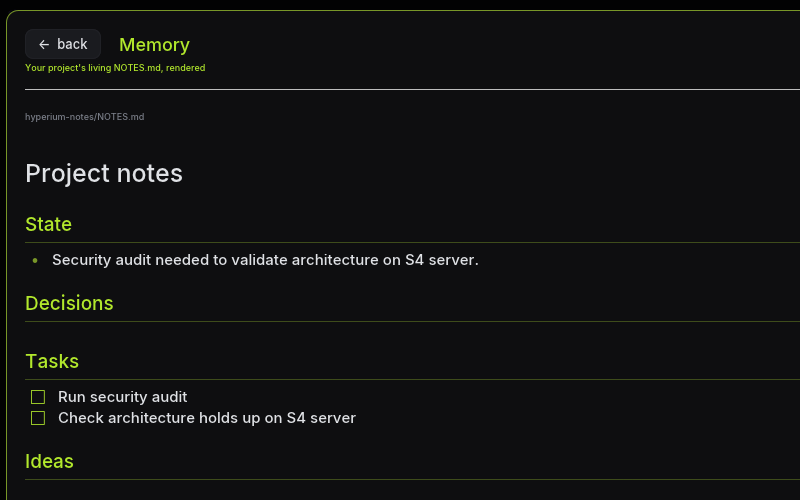
Now live Market
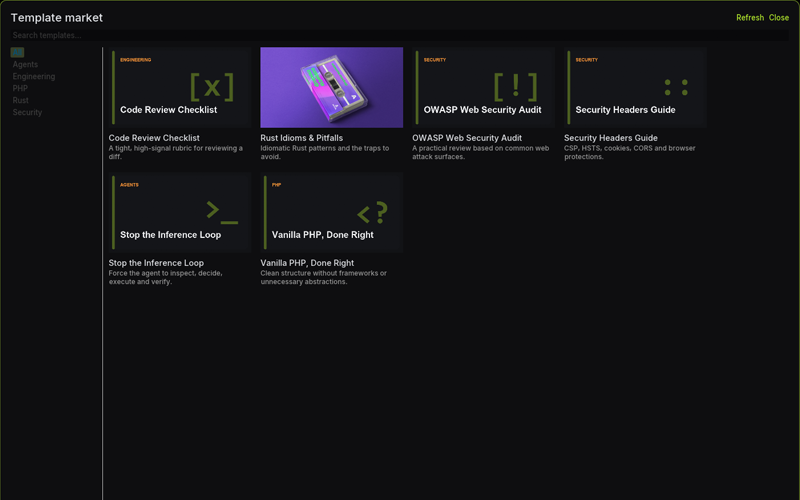
A browsable shelf of ready-made guidelines. Pick one and it drops into your project, then your assistant reads it: a cheap, deterministic way to hand it real expertise instead of burning inference to rediscover it.
Serious payload, playful packaging. Every item gets a name with character and a cover with attitude, a curated store you flick through from inside the cockpit.
The control room
Hit Ctrl+Space and the palette opens: a command memo for the incantations you keep re-googling, a quality-first media converter, a machine doctor that probes what this PC actually has, a health heatmap of your streaks. Small tools for real daily friction: the beating heart of the cockpit.
Ctrl+Space · the internal palette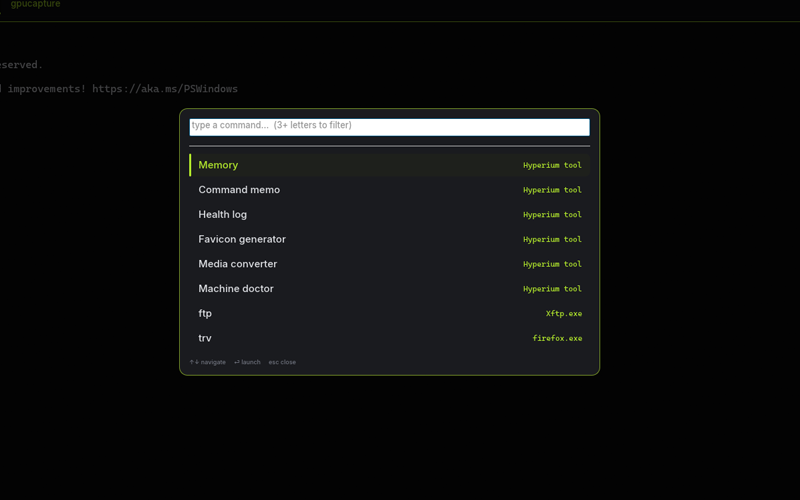
Built different
Every engineering choice points the same way: a fast native app that respects your machine and your data.
A truly native app, not a web page in disguise. It starts instantly and sips resources, no bundled browser eating your RAM.
Fonts, icon and assets embedded. Copy one file to a new PC and it just runs.
Your voice is transcribed locally and never uploaded. Sync goes to a server you host, end-to-end encrypted. Nothing phones home.
Every build is code-signed; each update's signature is checked before it's ever allowed to run.
By the numbers
Break your own limits. One cockpit, one keystroke, and the blank page never stood a chance.